




Preventis Portal
Bridging the Gap Between Home Testing & Professional Care
The Preventis® Portal is part of the SmarTest ecosystem, connecting at-home diagnostics with your clinical workflow. Track multiple biomarkers of your patient over time, adapt thresholds, and make data-driven therapy decisions without delay.
Part of Every SmarTest – Your Digital Link to Patient
As part of the SmarTest ecosystem, the portal receives results directly from the SmarTest app the moment a test is performed at home. All biomarkers are stored together, providing a comprehensive overview of each patient and their history. With intuitive graphs, adaptable thresholds, and instant result availability, the portal supports data-driven clinical decisions while reducing unnecessary lab send-ins or in-person visits. Patients benefit from modern, telemedical care, and professionals gain efficiency and clarity.

Instant Diagnostic Data for Fast Decision Making

Track biomarkers of your patients over time

Set thresholds to quickly identify critical results

Identify acute patients faster, manage non-acute patients remote

Save time and resources with optimized workflows
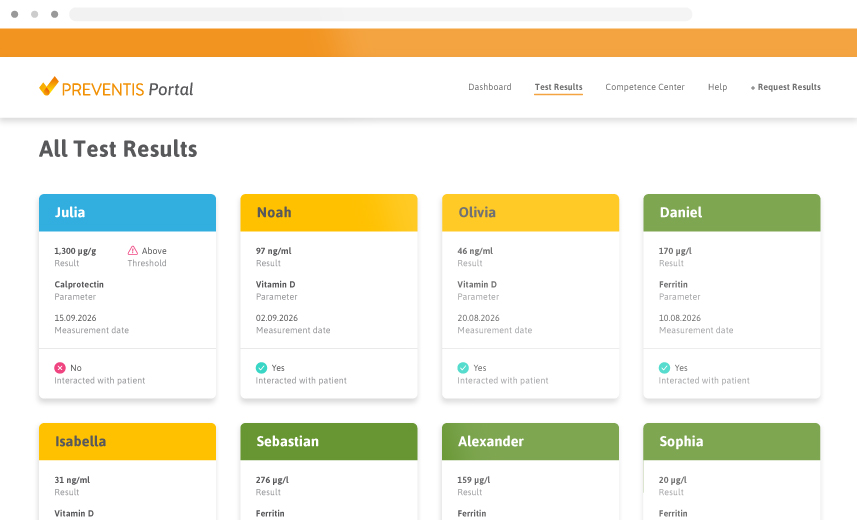

All Patients – One Clear Overview
The Preventis® Portal gives you a centralized view of all your patients’ SmarTest results. Each patient appears with their test history easy to access at a glance. Use the filter options to quickly find what you need.
- Navigate results through a clean, card-based interface
- All Test results in one single view
- Filter based on patients or thresholds
- Quick access to complete test history
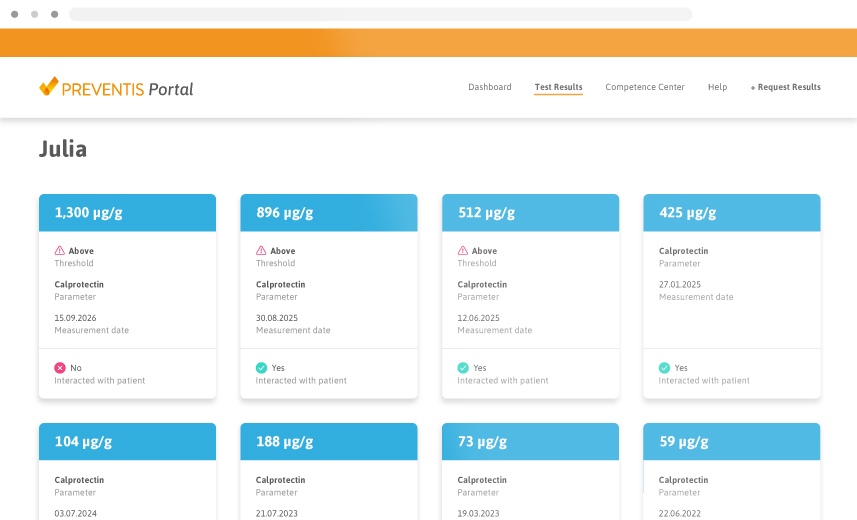
A Clear Picture of Your Patient
See all available SmarTest results for each patient in one place. From vitamin D to calprotectin, the portal provides a holistic perspective to support more personalized care. This enables better guidance in complex cases and strengthens trust by making health data transparent and accessible.
- Holistic perspective: view multiple biomarkers per patient at a glance
- For individualized diagnostics, especially in complex cases
- An insightful view for more confident decision-making
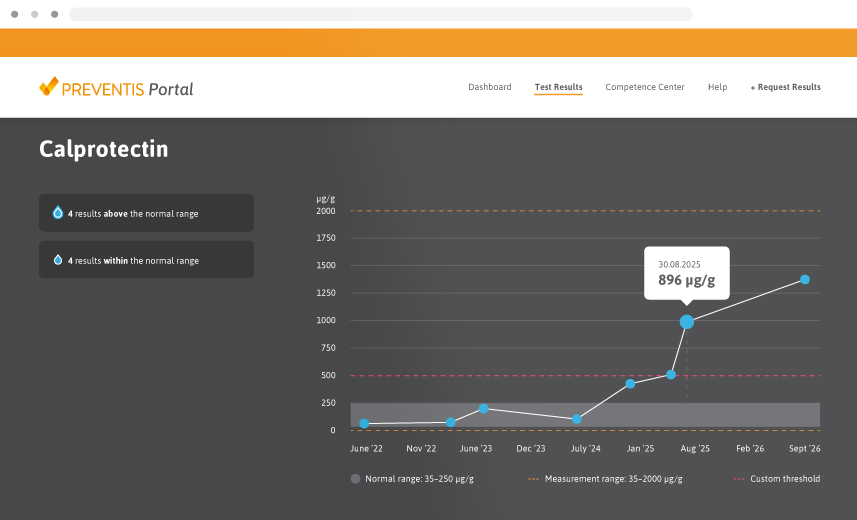
Visualize Patient Progress Over Time
The Preventis® Portal makes therapy monitoring simple and precise. Patient results are displayed in clear, interactive graphs with zoom functions for detailed analysis. Define thresholds for e.g. calprotectin and receive instant feedback when values move outside critical ranges. This ensures you do not miss important changes and can adjust treatment at exactly the right time. Numbers alone don’t tell the story.


Act Faster Together
The Preventis® Portal for professionals keeps your team up to date at every step. Intelligent notifications alert you to new patients, expiring links, or pending requests. Every interaction with patient results can be documented and is visible to the entire team – creating transparency, improving collaboration, and ensuring no case is overlooked.
- Instant alerts for new patients and results
- Notifications for open requests and expiring links
- Documented interactions for full team transparency
- For faster responses and action when it matters most
Define Calprotectin Thresholds & Get Alerts
With the Preventis® Portal, you can define a universal upper threshold for calprotectin levels. When patient results exceed the critical threshold, you receive automatic email notifications. This reduces manual data checks, ensures that important changes are not missed, and supports timely therapy adjustments.
- Define calprotectin thresholds for critical results
- Automatic alerts when results exceed the defined range
- Faster response to critical values, supporting timely therapy adjustments for patients with inflammatory bowel disease (IBD)

Secure for Patients. Simple for You.

Pseudonymized patient IDs for full privacy

Patients remain in control of all data sharing

Runs in your browser – no additional IT effort necessary

HL7 FHIR compatible for easy system integration

Integrate SmarTest Restults Securely Into IT-Systems
- HL7 FHIR API for efficient and reliable integration into clinical IT systems
- Secure authentication via a dedicated API key for each clinic or competence centre
- Encrypted data transfer to protect sensitive patient information
- Automated background retrieval of SmarTest results without manual portal login
- Direct transfer into the clinic’s patient information system
How SmarTest Results Reach Your Clinic

The clinic creates a Preventis® Portal account. The patient creates a mySmarTest® account.
The clinic requests a connection. The patient approves it in mySmarTest® and consents sharing results with the clinic.
The patient performs a SmarTest home test using the test kit and app while signed in to their account.
The quantitative result appears instantly in the app and is securely sent to the Preventis® Portal or connected IT system.